This is a terrible solution for running Windows software on your Mac through Parallels: Lowering the resolution of the virtual machine seems to speed up every element of the virtual machine itself, from opening files, to improving button and window layouts, to interaction as simple as pointing and clicking the mouse. Even Coherence Mode works better with a scaled resolution. Every single interaction with my Parallels virtual machine has improved since I decreased the VM’s resolution.
Changing the resolution is pretty easy:
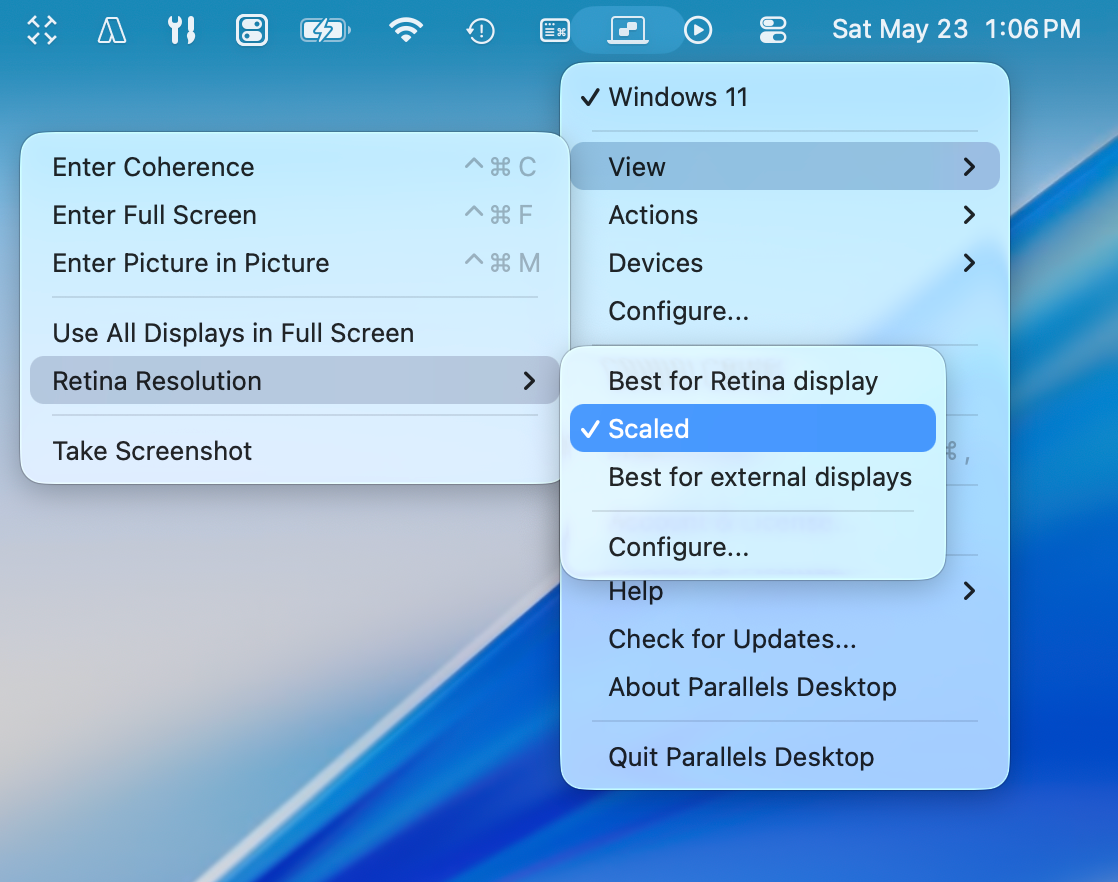
- Shut down your virtual machine (don't just suspend it; fully shut it down).
- Open the VM's Configuration window:
- Click the Gear icon in the Parallels Control Center, or go to the Mac menu bar and select Actions > Configure.
- Click on the Hardware tab at the top, then select Video (or Display) from the left sidebar.
- Look for the Resolution dropdown menu. You will generally see three options:
1. Best for Retina2. Scaled3. Best for external displays
Best for Retina is where I’ve always lived. This option utilizes the full high-DPI capabilities of your Mac. Text is razor-sharp, but elements often look tiny or require OS-level scaling.
Out of bad luck, when resizing the VM window, the scaling of the window dropped haphazardly on me, and I instantly noticed performance improvements across the board. I moved through the settings and found the scaling had flipped to “Scaled”, and I haven’t gone back since. Text is indeed softer, but every piece of software works as intended and as designed.
I’ve been a proponent of using Windows software on a Mac for a long, long time. Some pieces of software still sit exclusively inside Windows. Rather than fighting this reality, I recommend exploring the efficiencies Parallels provides. Too many people opt to run two computers — a Mac for personal use which syncs to their iPhone and iPad, and their work-issued Windows laptop — which causes distraction, syncing issues, and poor flow. Parallels fixes this in a nearly perfect way.
Indeed, some things don’t look perfectly sharp all the time. But they work — without distraction and hiccup — and this is all that counts.